Sound effects and music
Audio resources follow the same rule as textures: load once, reuse while the owner is active, and unload when that owner ends.
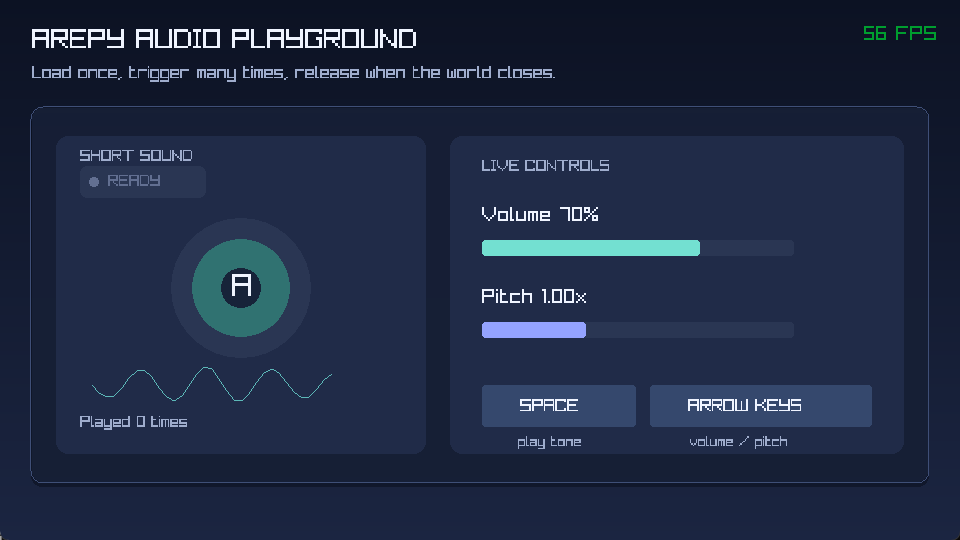
A screenshot cannot reproduce sound, so the example makes playback, volume, and pitch visible.
Sound effects
Short effects such as jumps, clicks, and impacts are loaded as ArepySound.
This complete setup gives the level ownership of one sound:
from pathlib import Path

from arepy import ArepyEngine, AudioDevice, Input, Key, SystemPipeline
from arepy.asset_store import AssetStore
from arepy.engine.audio import ArepySound


class LevelAudio:
    __slots__ = ("jump",)

    def __init__(self) -> None:
        self.jump: ArepySound | None = None


game = ArepyEngine(title="Audio example")
world = game.create_world("level")
assets = game.get_resource(AssetStore)
audio = game.get_resource(AudioDevice)
level_audio = LevelAudio()
world.add_resource(level_audio)


sound_path = Path(__file__).parent / "assets" / "jump.wav"


@world.on_startup
def load_level_audio() -> None:
    assets.load_sound(audio, "jump", str(sound_path))
    level_audio.jump = assets.get_sound("jump")


def jump_audio(
    input_device: Input,
    audio_device: AudioDevice,
    state: LevelAudio,
) -> None:
    sound = state.jump
    if sound is not None and input_device.is_key_pressed(Key.SPACE):
        audio_device.play_sound(sound)


@world.on_shutdown
def unload_level_audio() -> None:
    sound = level_audio.jump
    if sound is None:
        return
    audio.stop_sound(sound)
    assets.unload_sound(audio, "jump")
    level_audio.jump = None


world.add_system(SystemPipeline.INPUT, jump_audio)
The file is read in on_startup, not in the frame loop. The input system uses
the cached handle, and on_shutdown releases that same handle when the level
loses ownership. You can also change its volume and pitch through
AudioDevice.
Stream music every frame
Music is streamed instead of loaded as one short effect. Give the track a
reusable state object, start it in the world startup hook, then update its
stream buffers in UPDATE. The following block extends the game, world,
assets, and audio setup above:
from arepy.engine.audio import ArepyMusic


class LevelMusic:
    __slots__ = ("track",)

    def __init__(self) -> None:
        self.track: ArepyMusic | None = None


level_music = LevelMusic()
world.add_resource(level_music)
music_path = Path(__file__).parent / "assets" / "music.ogg"


@world.on_startup
def load_level_music() -> None:
    assets.load_music(audio, "level_music", str(music_path))
    track = assets.get_music("level_music")
    level_music.track = track
    audio.play_music(track)


def update_music(audio_device: AudioDevice, state: LevelMusic) -> None:
    track = state.track
    if track is not None:
        audio_device.update_music_stream(track)


@world.on_shutdown
def unload_level_music() -> None:
    track = level_music.track
    if track is None:
        return
    audio.stop_music(track)
    assets.unload_music(audio, "level_music")
    level_music.track = None


world.add_system(SystemPipeline.UPDATE, update_music)
game.set_current_world("level")
game.run()
Sound or music?
| Use | Best fit |
|---|---|
load_sound() |
Short effects reused often. |
load_music() |
Long tracks streamed over time. |
set_sound_volume() |
Mix an individual effect. |
set_music_volume() |
Mix a music channel. |
pause_music() / resume_music() |
Pause menus and focus changes. |
seek_music_stream() |
Scrubbing or resuming a track. |
Asset ownership
Choose one clear owner for each loaded asset. AssetStore belongs to the
engine, so switching worlds does not unload its contents automatically.
- A world-owned sound or track is loaded in
world.on_startupand unloaded inworld.on_shutdown, as in the examples above. - A sound shared by several worlds needs an application-level owner. Do not unload it when the first world closes; release it after the last user stops.
- Pair each successful
load_sound()orload_music()with exactly one matchingAssetStore.unload_sound()orAssetStore.unload_music()call. - Stop music before unloading it. Clear cached handles after release so later systems cannot use an invalid resource.
Desktop and web
The Raylib desktop backend provides sound and music playback. The web audio adapter is an extension point and does not provide equivalent playback.
See the complete
examples/audio_demo.py
for visible playback, volume, and pitch controls.